

For business Clothing stores
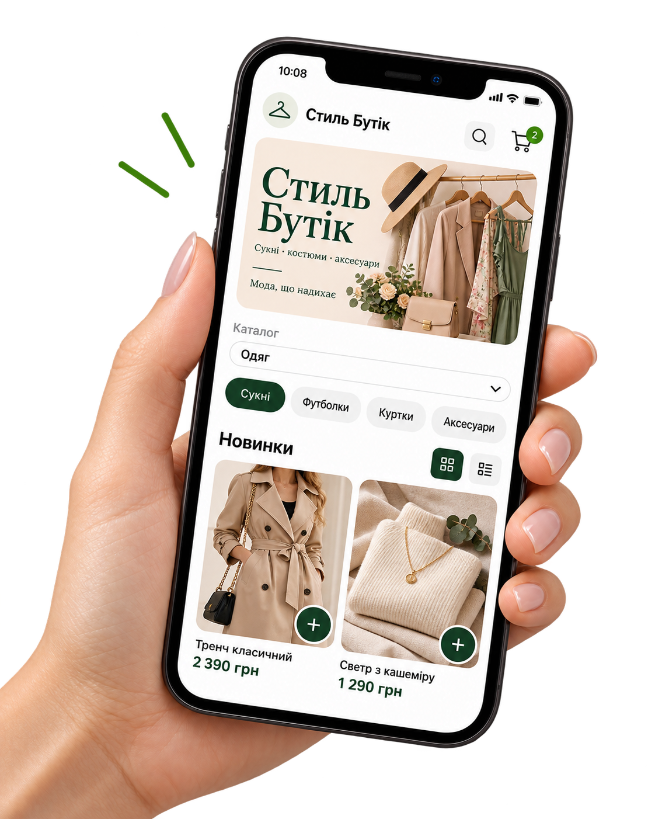
Your clothing catalog in one link
Show photos, prices, and categories — fewer repeat Direct replies and more ready-to-buy orders.
How Kliovio helps a clothing store
-
Categories for your collection
Organize the way shoppers browse: new in, outerwear, accessories.
-
Clear photos and prices
Customers see the item before messaging you.
-
Social profile link
One link instead of sending dozens of photos in chat.
-
Pickup and delivery
Enable the fulfillment options you really support.
Want the full walkthrough?
We explain the application, dashboard, products, payment, delivery, QR code, and the first order in more detail.
Where to use the QR code
QR works offline wherever people already see the clothes.
-
Tags and packaging
A code on a tag or bag for the next purchase.
-
Shop window
A scan from the street opens the full catalog.
-
Printed cards
Hand them out at markets and pop-ups.
-
Market stall
Catalog on hand even with a limited rack.
How an order works
-
1
The customer opens the catalog
Via your link or QR code — on a phone, no app install.
-
2
They place the order
They choose pickup or delivery and a payment method you enabled.
-
3
You see the order in admin
Phone number, items, and status stay under your control.
-
4
You fulfill the order
Prepare the items and handle pickup or your own delivery.
There is no size/color variant builder or stock sync: create separate products or note options in the name and description.
First month free · then 299 UAH/mo
Simple pricing for a small shop
First month free. Then a fixed monthly fee. The Kliovio fee of 0.25% applies only to verified successful online payments; your payment provider may charge separately. You arrange delivery yourself.
FAQ
- Are there size and color variants?
- There is no variant builder. Create separate products (for example “Dress M”) or describe availability in the text.
- Does inventory sync?
- No. You manage availability manually — disable a product when it sells out.
- Can I take online payments?
- Yes, if you connect a payment provider. Terminal, cash on receipt, and bank transfer are also available.
- Does it work for a showroom?
- Yes: a browsing catalog plus pickup at the showroom.
Related business types
Show the collection in one link
Create a store and add the first items today.